
· Abraham · Alyss AI · 3 min read
Alyss AI Architecture v1.0.0
Exploring the evolution towards a modular architecture, latency challenges, and the integration of LangGraph, MCP, and SGLang.
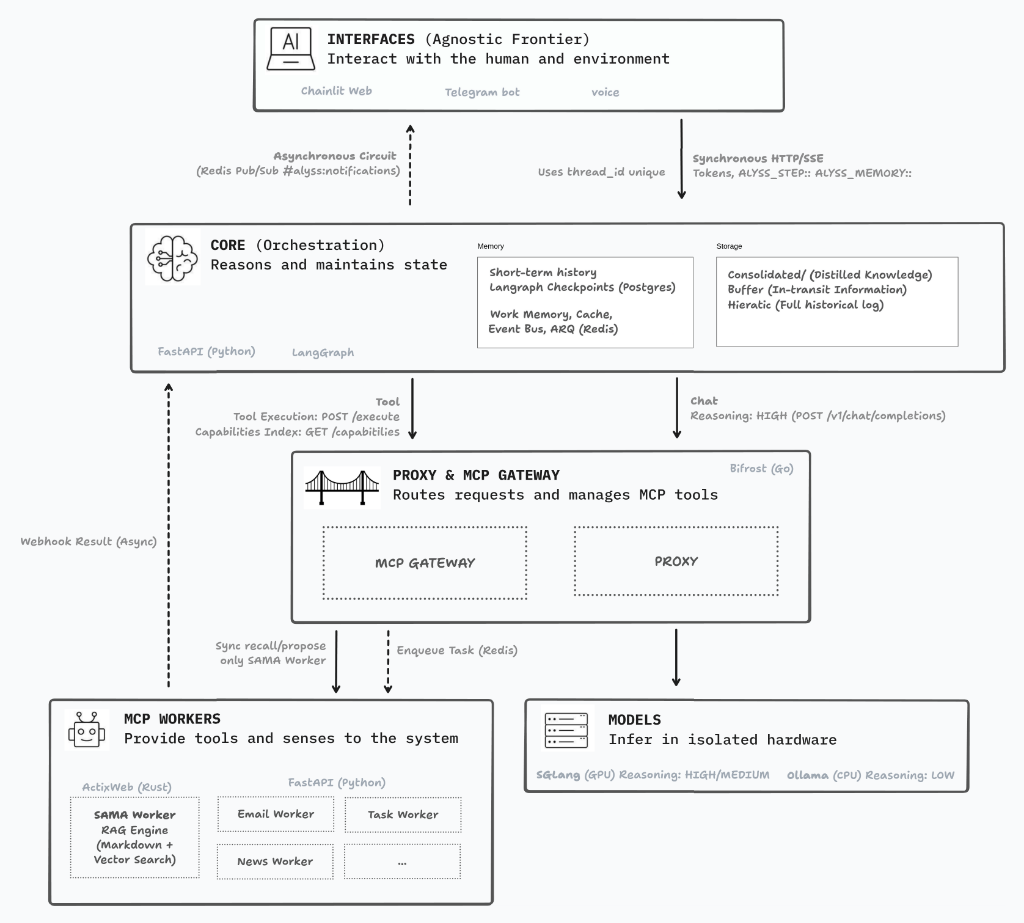
I’ve spent quite a few proof-of-concept rounds visualizing how the project’s architecture, folder structure, and code flow should look. And I think I’m finally ready to pull the trigger on version 1.0.0; if it fails, no big deal—we tear it down and start over. :)
For the architecture diagram, I’ve opted for a highly modularized ecosystem. My biggest concern with this approach (aside from keeping it consistent and aligned with standards) is latency. The idea of having everything dockerized makes deployment, maintenance, and scaling incredibly easy, but those extra layers and containers will inevitably add some lag.
It’s the eternal dilemma: do I build a monolith, which is more efficient for local execution, or bet on decoupled layers so I can distribute it across multiple machines in the future? In the end, I’ve gone with the latter, but I’m applying strategic decisions at every layer to try and mitigate that delay.
The Brain and the Interfaces
In my early tests with the Chainlit interface, I found it to be a fantastic framework. It lets you customize the experience exactly how you want it, with custom logic flows and real-time token streaming. It’s not perfect; there are a few things that haven’t quite convinced me yet, but that might just be my own lack of expertise for now.
For the “Core” or orchestrator, I’m finding LangGraph more and more comfortable. Keeping this layer in Python makes perfect sense because LLMs reason much more accurately over logic and schemas expressed in Python. Plus, it gives me massive flexibility to iterate quickly on the personality and decision-making flows of Alyss AI.
Bifrost and the MCP Workers
In an earlier version, I exposed my tools directly to LangGraph. It worked fine, but it absolutely devoured context, and my hardware is limited. Now, I’m betting on an approach based on MCP (Model Context Protocol) using Bifrost as a gateway.
Bifrost acts as both a gateway and a proxy for the models, as well as an orchestrator for the tools. The idea is that LangGraph no longer needs to swallow the massive schemas of every single tool; Bifrost hands it a compressed index instead, saving a huge amount of tokens. Furthermore, the fact that Bifrost is written in Go promises low network latency. In previous tests, I used LiteLLM as a proxy, but with Bifrost, I can unify everything; it’s a much cleaner setup, and I expect it to be faster.
The Engine Room: Ollama and SGLang
Finally, the hardware. For now, I’m working with a 3080 with 12 GB, which is a challenge and honestly quite tight. I’ve always used Ollama for various personal projects, and it still has a place in this architecture, but I’m relegating it to running lightweight models on the CPU for simple worker tasks (like formatting or basic decision-making).
The real game-changer for me is SGLang. I’ll be using it as the primary runtime running on the GPU. Why? On a card with limited VRAM like mine, memory management is critical. SGLang uses RadixAttention, which basically “caches” system prompts and tool definitions. By not having to re-process those common tokens in every turn, it promises much faster responses (Time To First Token). You can see the performance results in my recent benchmark article.
On top of all this, we have the SAMA Worker, which will handle RAG and vector search to ensure Alyss AI has a rock-solid memory.
I’ll let you know how this entire stack holds up. :)
Author's Note: English is not my mother tongue. While I lean on digital tools for translation, I personally oversee every word to ensure that the human intent and the original soul of my Spanish writing remain intact. This is a journey of ideas, not just algorithms.